
We install CAS on a legacy server:
HP ProLiant DL380 Gen9
2 x Intel(R) Xeon(R) CPU E5-2650 v3 @2.30GHz
32 GB RAM 2133 MgHZ
After I install the CVM, the Nodes shows that the available Memory is around 17G.
When I try to create VM, with 12GB memory, it shows:
Start VM "VM-DIGIFORT"failed.Reason:Cannot perform this operation. The reserved memory of the target host (the smaller value of 10 GB and 20% of the host's total memory) must be less than the available memory of the target host minus the VM memory.
When I try to create the VM with 7GB memory, it shows:
Start VM "VM-DIGIFORT"failed.Reason:Cannot perform this operation. If the target host is the primary or backup management node, the reserved memory of the target host (the smaller value of 20 GB and 40% of the host's total memory) must be less than the available memory of the target host minus the VM memory.
When I try to create the VM with 5GB, it seems like okay for the first day. However, I found that: If I create a VM with 5GB, and startup. I can hot-add Memory to 12G and it didn't stop the VM. Can you help to explain that?
And in the second day, it shows the error again even the memory is 5GB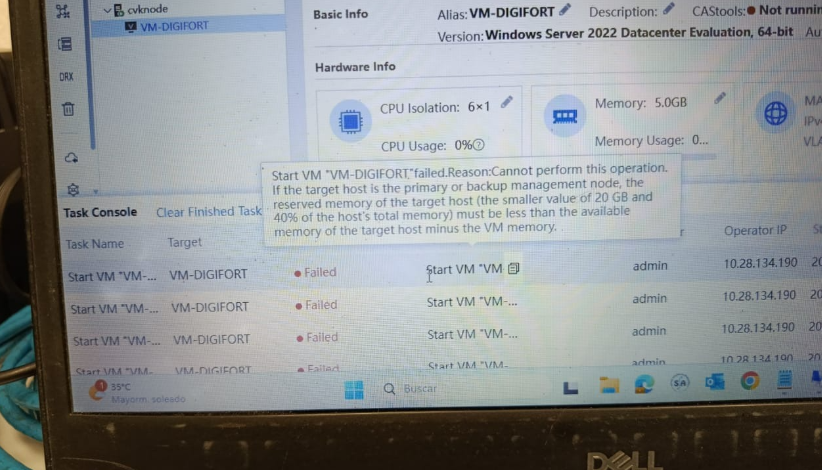
The reason for this problem is that the server's memory is insufficient, so the virtual machine cannot be started.
For details, please refer to the CAS help guide.

(0)
Dear user, please log in to perform this operation!
Confirm